

Command Palette
Search for a command to run...
Search for a command to run...
Search for a command to run...
If you’re unable to see your Elite Trader Funding (ETF) account in NinjaTrader, the issue could be caused by the "Global Sim Mode" setting. Disabling this mode will allow your Rithmic account to appear in NinjaTrader.
Why Is Your Account Not Showing?
In NinjaTrader, when "Global Simulation Mode" is enabled, your account is restricted to simulation-only trading. This prevents your live or funded accounts, including Rithmic accounts, from displaying. To resolve this, you’ll need to disable the Global Sim Mode.
How to Disable Global Simulation Mode in NinjaTrader
To access your Rithmic account, follow these simple steps:
NinjaTrader Control Center > Tools > Uncheck Global Simulation Mode
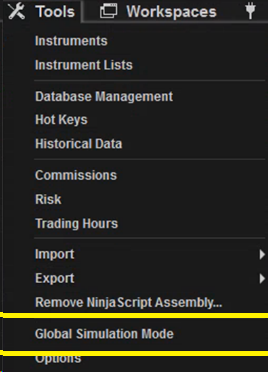
By following these steps, you’ll be able to view and access your ETF account in NinjaTrader.
When to Use Global Sim Mode
While it's important to disable Global Sim Mode to access live accounts, there are situations where simulation trading is useful. You can use Global Sim Mode for practice or testing strategies in a risk-free environment. However, when you're ready to trade live or view your funded account, make sure this mode is disabled.
Troubleshooting Tips