Step 1: Log into TradingView
- Access TradingView: Go to the TradingView Charts page and log into your account if you haven’t already.
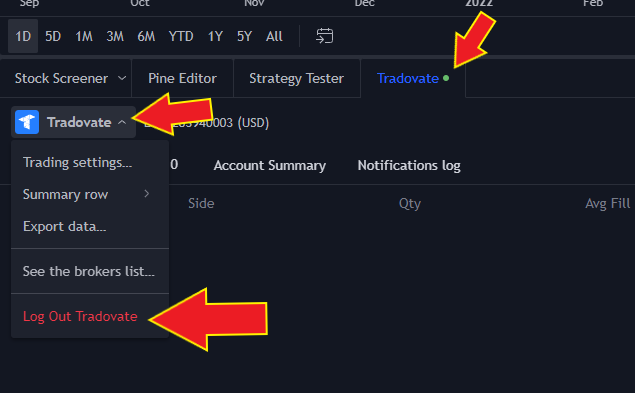
- Open the Tradovate Panel: Once logged in, navigate to the chart screen and look for the Tradovate tab in the trading panel.
Step 2: Access the Tradovate Logout Option
- Click on the Tradovate Tab: In the trading panel, click the Tradovate tab to reveal your connected Tradovate account details.
- Select “Log Out Tradovate”: In the Tradovate dropdown menu, choose Log Out Tradovate to disconnect your account securely.
For additional help, please open a support ticket via the Boomeo AI chat.

